How to wear your fitness tracker for accurate heart rate readings
Wear it snug, on top of the wrist and a finger above the wrist bone, then move it higher and tighter for workouts. Here is why each step matters, and what fit cannot fix.
- Read
- 5 min
- Length
- 1044 words
- Published
- By
- Data2Fit
If your watch shows a heart rate that jumps around, freezes during a workout or reads far higher than you feel, the cause is usually where and how you wear it. Wear it snug, on top of the wrist, about a finger's width above the wrist bone, and move it a little higher and tighter for workouts. Apple, Garmin and Google's Fitbit all give versions of that same advice in their support pages.
The reasons are physical, and once you know them the fixes make sense.
How the wrist sensor reads your pulse
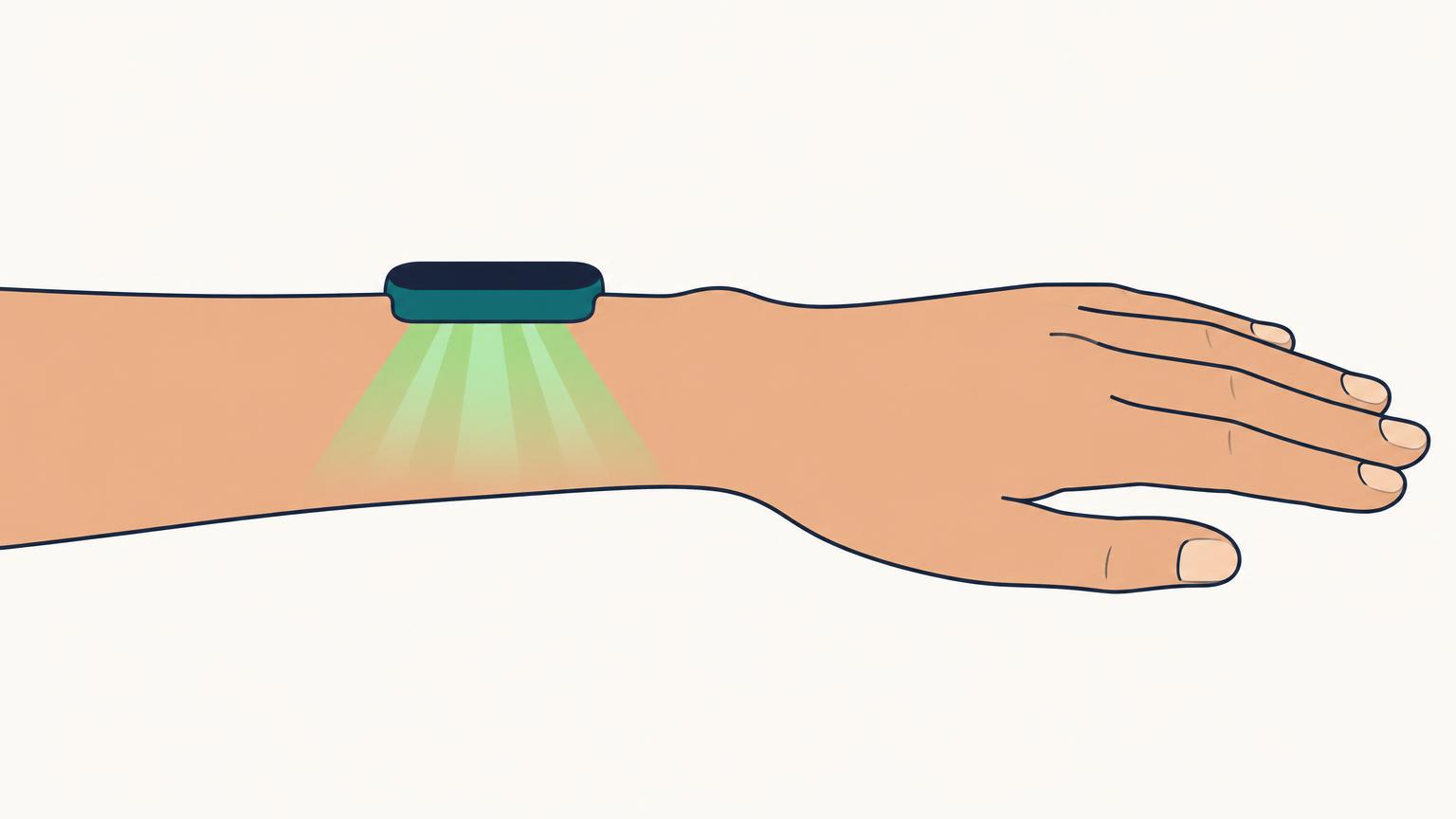
The bumps on the back of most watches and bands hold an optical heart rate sensor. It shines light (usually green LEDs) into the skin and measures how much comes back. Each heartbeat pushes a little more blood through the tiny vessels under the sensor, which absorbs a little more light. The watch counts those rhythmic changes and turns them into beats per minute. The method is called photoplethysmography, or PPG.
That signal is small. Anything that lets outside light leak in, moves the sensor across the skin, or reduces blood flow under it makes the pulse harder to pick out from noise. Every piece of advice below works on one of those three problems.
Fit: snug, on top of the wrist, not on the bone
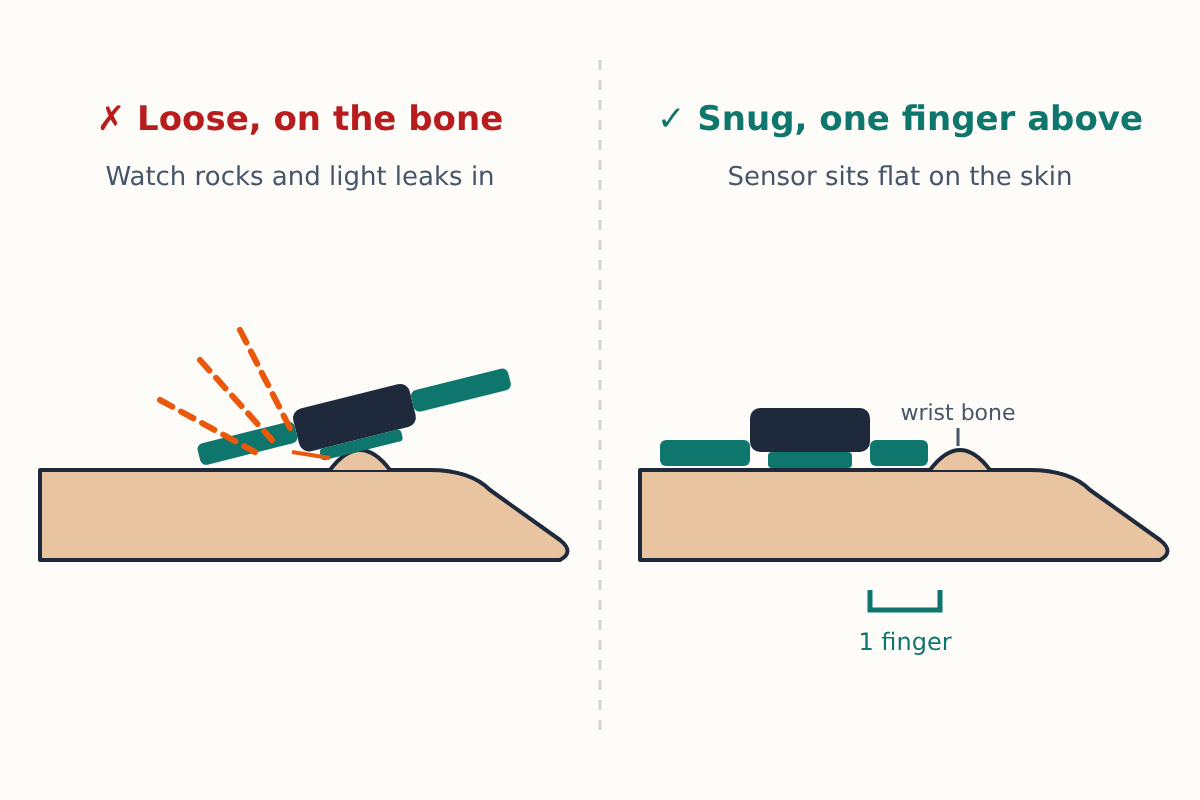
Apple asks for a fit that is snug but comfortable, on the top of the wrist, with the sensor staying against the skin. Garmin's manuals say to wear the watch above the wrist bone and keep it snug but comfortable, and add that it should not shift while you run or exercise. Google's Fitbit help says to wear the device on top of the wrist with the back touching the skin, a finger's width above the wrist bone when you are not exercising.
The wrist bone matters because a band sitting on that bump rocks back and forth. Every rock lifts one edge of the sensor, lets light in and smears the signal. One finger's width up the arm, the watch sits on flatter, softer tissue.
Tighter is not always better. Google's Fitbit guidance warns that a band so tight it restricts blood flow can weaken the heart rate signal. A quick check: you should not be able to slide the watch around your wrist, but it should not leave a deep dent when you take it off.
For workouts: a little higher and a little tighter
Movement is the biggest source of error, because the sensor slides and your tendons shift under it with every stride or grip. Google's Fitbit help suggests wearing the device a bit higher and tighter during exercise, since blood flow increases farther up the arm. Apple suggests tightening the band for a workout and loosening it afterwards.
In practice that means moving the watch up about two fingers before you start and taking the strap in by one hole. Put it back for the rest of the day, when comfort matters more and you are mostly still.
Skin, sunscreen and a clean sensor
Garmin's manuals add a few habits that cost nothing:
- Clean and dry your arm before putting the watch on.
- Keep sunscreen, lotion and insect repellent out from under the watch.
- Avoid scratching the sensor window on the back of the watch.
A film of lotion or sweat sitting on the sensor scatters light before it reaches your skin. Wiping the back of the watch with a damp cloth after a sweaty session keeps the window clear.
Things fit can't fix
Some limits come from your body or the setting rather than the strap.
Cold. Apple notes that blood flow through the skin (it calls this perfusion) varies between people and with the environment, and that in the cold your wrist may have too little perfusion for the sensor to get a reading. Early in a winter run the number may be patchy and settle once you warm up. A sleeve over the watch helps.
Tattoos. Apple's support page says the ink, pattern and density of some tattoos can block light from the sensor. If you have a solid, dark tattoo where the watch sits, wearing it on the other wrist is the simplest test.
Irregular movement. Apple says rhythmic movement, such as running or cycling, gives better readings than irregular movement, such as tennis or boxing. Gripping a bar or a racket also flexes the wrist tendons under the sensor. For strength sessions, intervals and racket sports, a wrist reading will be less reliable however well the watch fits.
For those sessions the better tool is a chest strap, which measures the heart's electrical signal instead of blood flow. Garmin's manuals say that when both a wrist reading and a chest strap are available at the start of an activity, the watch uses the chest strap.
Choose the right workout type
The workout you select changes how the watch processes data. Apple advises choosing the Workout app type that best matches what you are doing, such as Indoor Run for a treadmill, and says calibrating with outdoor walks or runs helps the watch learn your stride and fitness for distance, pace and calorie estimates. Garmin and Fitbit work the same way: an activity profile tells the device what kind of motion to expect.
A quick check before you trust the numbers
If a reading looks wrong, compare it with a manual count. Sit still for a minute, find your pulse at your wrist or neck, count beats for 30 seconds and double it. If the watch is within a few beats at rest but drifts during hard efforts, fit and movement are the likely cause, not a faulty sensor.
Most of what makes your wearable's scores useful, from resting heart rate to HRV, rests on this one sensor. A watch that sits flat and still on the skin gives every one of those numbers a better start.
A heart rate that stays very high or very low at rest, or an irregular rhythm alert, is a reason to talk to a doctor rather than adjust the strap.
