
How to set heart rate zones on your watch so they match your body
Most watches build zones from an age-based maximum that can be off by ten beats or more. How the three zone methods differ, how Garmin and Apple Watch set them, and how to give your watch better numbers.
- Read
- 5 min
- Length
- 1048 words
- Published
- By
- Data2Fit
Heart rate zones are only as good as the two or three numbers they are built from. Most watches start from an estimated maximum heart rate, and that estimate can be off by more than ten beats for any one person. Setting your zones well means choosing a method, giving the watch better inputs, and checking the result against how the effort feels.
What a zone actually is
A zone is a band of heart rates, usually five of them, from very easy to all-out. The watch works out the band edges from a formula and tells you which band you are in during a workout and how long you spent in each.
There are three common ways to anchor those bands.
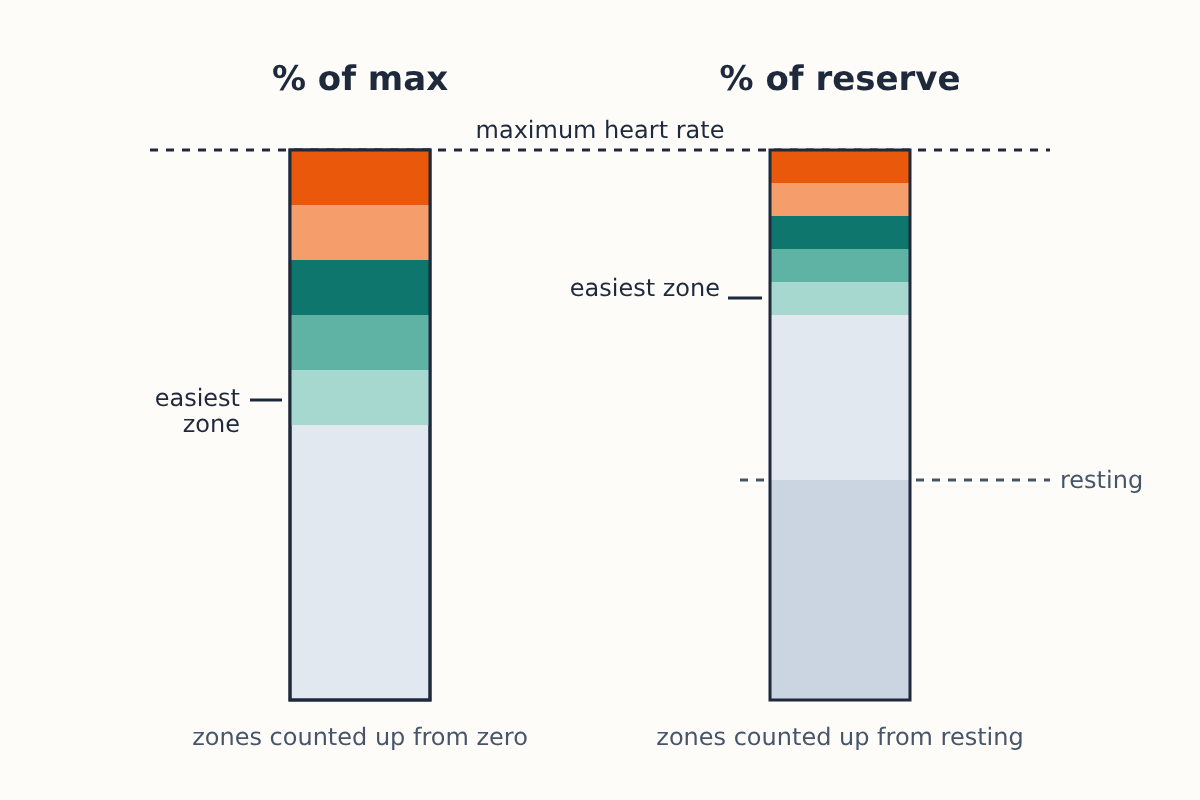
The simplest is percent of maximum heart rate: each zone is a share of your max, and many watches use it by default.
Percent of heart rate reserve, often called the Karvonen method, works on a narrower range. Reserve is your maximum minus your resting heart rate, and each zone is a share of that range added on top of your resting rate.
The third option anchors zones to your lactate threshold heart rate, the point where effort tips from sustainable to unsustainable for long. Many coaches prefer it because it tracks your fitness rather than your age.
Why the default is often off
If you have never measured your maximum heart rate, the watch estimates it from your age. The old rule is 220 minus age. A 2001 meta-analysis by Tanaka, Monahan and Seals in the Journal of the American College of Cardiology proposed 208 minus 0.7 times age, and found the older formula underestimates the maximum in older adults. For a 60-year-old, that is 160 beats per minute by the old rule and 166 by the newer one.
Either way, it is an average for a population. When researchers in the HERITAGE Family Study compared both formulas with measured maximums in 762 sedentary adults, the typical error was about 11 to 12 beats per minute (PMC3935487). Your real maximum could sit well above or below the estimate, and every zone moves with it.
The same percentage, two different heart rates
Take that 60-year-old, with a resting heart rate of 60 and a maximum of 166.
- At 60 percent of maximum, the zone starts at about 100 beats per minute.
- At 60 percent of heart rate reserve, it starts at 60 plus 60 percent of 106, which is about 124.
Neither is wrong. They are different definitions, which is why your zones can jump when you switch methods or move between apps. Pick one method and stick with it, so your history stays comparable.
How the big platforms set zones
Garmin. Garmin's manuals say the default lets the watch detect your maximum heart rate and set zones as a percentage of it. Under the heart rate zone settings you can base zones on beats per minute, percent of maximum, percent of heart rate reserve or percent of lactate threshold heart rate, and enter your maximum, resting and lactate threshold heart rates yourself. Some models can also detect these values during activities; check your model's manual for which ones.
Apple Watch. Apple calculates automatic zones from your resting and maximum heart rate using a heart rate reserve approach, and they only work once your date of birth is in the Health app. You can switch to manual zones in the Workout settings and type in your own band edges.
If you use more than one app, check where each one takes its zones from. Training platforms often keep their own settings rather than reading your watch's.
Better inputs, better zones
Resting heart rate. This one is easy, and your watch already measures it every day. Use a typical value from a normal week rather than one unusually low morning. Our explainer on why watches disagree about resting heart rate covers how each device measures it.
Maximum heart rate. The most reliable number is the highest one you have actually seen in a hard, well-recorded effort, such as the end of a race or a hill repeat at full effort. Check that the peak is real: a single spike far above everything else is often a sensor glitch. For hard efforts a chest strap gives a cleaner peak than the wrist, for reasons explained in our piece on when a wrist reading falls behind a chest strap.
An all-out test is only for people who are healthy and already used to hard training. If you are new to exercise, have a heart condition or take medication that changes heart rate (beta blockers, for example), talk to a doctor before chasing a maximum, and lean on how the effort feels instead.
Lactate threshold heart rate. Some Garmin models offer a guided threshold test; your manual says whether it needs a chest strap. Without one, a common field approach is the average heart rate over the last part of a hard, steady 30-minute solo effort, but treat it as an estimate.
Check the zones against how it feels
Numbers drift; perceived effort is a good cross-check. In your easiest zones you should be able to talk in full sentences. Around threshold you can say a few words at a time. In the top zone, talking stops.
If your watch says you are in zone 4 while you could chat comfortably, your maximum is probably set too low. If an easy jog keeps landing in zone 1 while you are breathing hard, it may be set too high, or the wrist sensor may be misreading. Getting the fit right first helps: see how to wear your tracker for accurate heart rate.
Revisit your zones every few months, or after a long break or a block of training. Resting and maximum heart rate both change, and zones built on last year's numbers will drift away from how you train today.
Chest pain, dizziness, an unusually racing or irregular heartbeat during exercise, or an irregular rhythm alert from your watch are reasons to stop and see a doctor.
